Auto-connect your #Twitter tweets to #LinkedIn

As I mentioned earlier, the posts on my weblog automatically get tweeted to Twitter, as well as Facebook, Plaxo and Hyves. I felt sorry for my LinkedIn account. I’m not keeping it up to date with status updates, because I refuse to enter the same information in all those networks manually if those clever computers can’t do it for me. And that hanged today as Guido Jansen shows us in a presentation how to connect your twitter timeline to LinkedIn status updates. The system responsible for this is ping.fm and while I was there anyway, I decided to take care of MySpace as well 🙂

Meaning: the posts on my weblog are automagically reposted to:

  1. Twitter
  2. Facebook
  3. Plaxo
  4. Hyves
  5. LinkedIn and
  6. MySpace

Right! That saves a lot of time and this way everybody gets to read the stuff they’re interested in on the network of their choice. The only thing left on my wishlist is Hyves. Hyves doesn’t like Twitter’s #hashtags, which currently results in hashtagged tweets not being posted to Hyves. Ping.fm is able to remove hashtags (as it does with LinkedIn), but it has no support for Hyves yet (or the other way around).
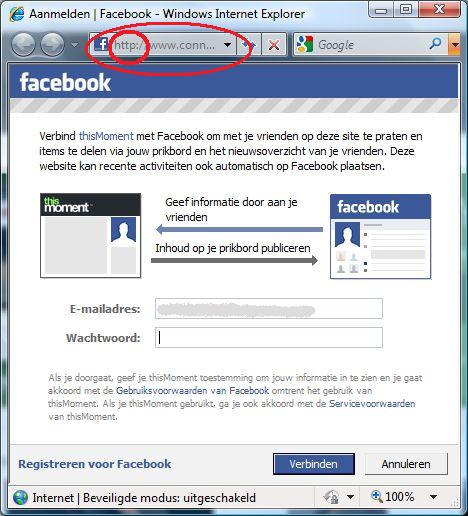
Click here to log in using your @Facebook account

There are lots of websites (including dae’s weblog) that allow you to log in using your Facebook account. It’s strange you get a pop up window that hardly shows you the URL, which means you don’t know if you’re really submitting your credentials to Facebook, unless you check it first. And since the Facebook window doesn’t use an SSL-certificate, your name and password are sent over the network in plain text anyway. Wouldn’t it be better if this window featured an SSL certificate and a bigger URL bar, that shows exactly where your name and password are going?

Klik hier om je aan te melden met je Facebook-account

@LauraChappell University Projects Page #WireShark #Twitter @TweetDeck

If you put your ear to the railroad (make sure there’s no train coming!), you can hear what’s going on. That’s exactly what Laura Chappell did to “hear” the traffic that crosses your network as soon as you use Twitter. She captured all traffic (in so called WireShark Trace Files) and she wrote two amazing reports about it (one about Twitter in general and one about TweetDeck). The available trace files will help you to follow her steps of research. Try it yourself! Interesting!

Chappell University Projects Page